my super efficient FOSS productivity system
Table of Contents
Procrastination is the worst! We all deal with it one way or another, sometimes it gets the better of us, while other times we manage to tame it.
However, there is something worse than procrastination, and that is when you have no direction whatsoever. Wind can blow you to any direction.
Luckily you can combat and conquer this with:
- being organized and having a consistent list of TODOs.
- having an efficient system that works for you.
So let's see how I manage to do it with free open source software.
Introducing calcurse
From the official website:
calcurse is a calendar and scheduling application for the command line.
calcurse is simple but by no means limiting, as it has all the essential features one could expect from a calendar app and does all I could ever want.
For instance, it has the so-called "recurring tasks" feature which is must in any calendar and TODO app.
Here's mine in action:
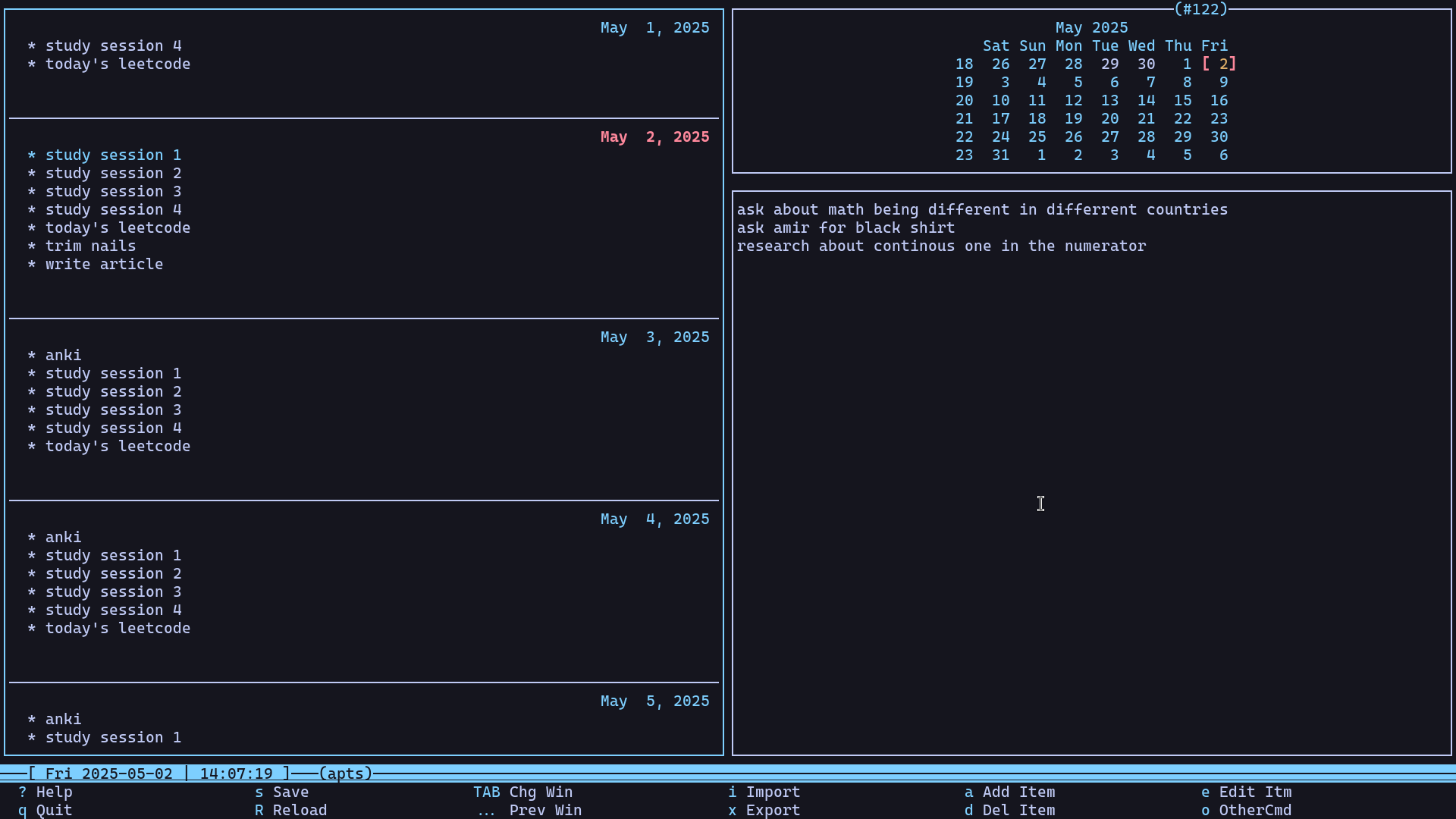
This is not a calcurse tutorial so I would not go in-depth into its various features and settings, but let's thoroughly examine how I use it to make my life more organized.
On the left pane, you can see my tasks for a given day. The ones marked with a star(which are all of them), are recurring tasks, meaning I specify the interval when adding the task and it automatically gets repeated every n days.
Recently I've been studying for computer engineering's master's university entrance exam, so I try to study 4 sessions each day, ideally 2 hours each so 8 hours in total each day.
I also do daily leetcodes to not get rusty at DSA.
Lastly, I must do my daily anki reviews, which I'll discuss later in the article.
Adding TODOs to calcurse
There are times when an idea occurs to me and I don't want to forget it, or I have a TODO that's easy to forget. It sucks forgetting it and not remembering it or remembering it too late. So I have made it as effortless as possible to add the idea/TODO to calcurse.
I have the following bash script:
#!/usr/bin/env bash
todo_path="/calcurse/todo"
todo_text=""
todo_prio=""
todo_item="[] "
Which I bind to a key in sxhkd:
# Calcurse Todo
; ;
The script basically prompts you with rofi to enter your idea/TODO. It then adds it as a todo in calcurse.
Seeing today's tasks
There are times when you have too many things to do in a single day. So you want to see a list of your tasks without opening calcurse.
You can either enter calcurse -d1 in the terminal or better, have a shortcut that shows your tasks as a notification:
# Calcurse Appointments
; ;
Now, upon hitting super + control + s, then letting go and pressing c, and again letting go and pressing a you will see a notification showing you your remaining tasks for that day.
note that you need to have a notification daemon installed for this to work. I use dunst.
Anki
In the description of this article I claimed that "memory is a choice, not a chance." but how? Enter anki.
Anki is a free and open source spaced-repetition flashcard program that establishes itself from the competition for the following reasons:
- It has a machine learning algorithm called FSRS that adapt to your learning patterns and promises to make you review cards just in the right time for maximum efficiency.
- It can be extended with plugins.
- One can easily import and export decks.
- One can make custom card types with html and css.
I will not go into the various features of anki and how to start with it, since that needs a series of articles on its own!
So if you have no idea about anki, watch this video which goes over the basics of anki. Also watch this video to learn about the best anki settings.
I study reference books, which are super dense and long, so without constant reviewing there is no way I'll remember much. So I typically make anki flashcards page in and page out.
I tend to use the image occlusion enhanced add-on to make visual flashcards on the fly like this one(click on it to see the back of the card):
There are also times when it makes more sense to just add a basic front and back flashcard.
But either way, I keep it simple.
Quality of life zsh functions for further automation
I have two main zsh functions and a complementary one that just abstract away the commands I have to enter to have the following workflow:
- study for 2 hours
- open calcurse and mark my n-th session as done
- take a 5 minute break, after which a notification is sent, telling me to "go back to studying"
- repeat
The complementary t2s function
Which converts human-readable time formats to seconds(E.g. 2h5m => 7500).
The study function
the rest function
termdown is a terminal countdown timer and stopwatch which I use to track my study times.
putting it all together
- Have a tmux window dedicated to studying.
- Run the
study 2hcommand in it. - Start studying.
- Make flashcards in anki when appropriate.
- Repeat.
And this is how you stabilize your memory and avoid procrastination.